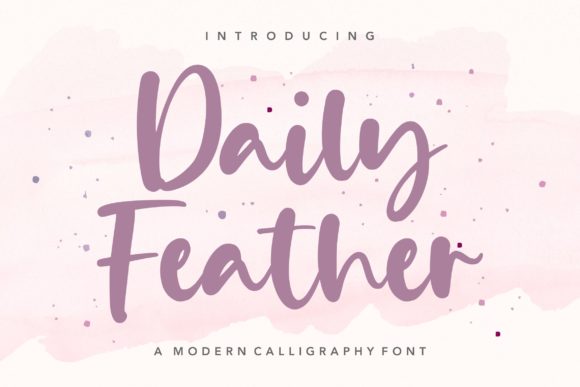
Discover Daily Feather: A Handwritten Font for Modern Web Design
As a web designer, I'm always on the lookout for fonts that can add a touch of personality and charm to my projects. Recently, I had the opportunity to test Daily Feather, a relaxed handwritten font, in a real website layout. The results were nothing short of delightful, and I'm excited to share my experience with you.
A First Impression: Sweet Flow and Balanced Characters
The first thing that struck me about Daily Feather was its sweet flow and well-balanced characters. This Script Amp font has a natural, almost effortless quality that makes it perfect for adding a personal touch to any digital design. Whether you're working on a boutique online store, a coaching website, or a creative portfolio, Daily Feather brings a sense of warmth and authenticity.
Testing in Real Layouts: Hero Sections and Call-to-Action Areas
I started by testing Daily Feather in the hero section of a boutique online store. The font's flowing, handwritten style immediately caught the eye, making the header feel more inviting and less formal. The balance between the letters and the overall flow of the text made it easy to read, even at larger sizes. For a call-to-action area, I used Daily Feather for a button label, and it added just the right amount of creativity without overwhelming the user.
Responsive Design and Mobile Readability
One of the key aspects of modern web design is responsiveness. I was pleased to see that Daily Feather held up well on mobile screens. The font's clean lines and balanced characters maintained their readability, even when scaled down. However, I would recommend using it sparingly for longer text blocks, as it can become a bit too decorative for body copy. Instead, pair it with a clean sans serif font for a harmonious and functional design.
Visual Hierarchy and Branding: Elevating Your Digital Presence
Daily Feather is an excellent choice for establishing a strong visual hierarchy. In a product landing page, I used it for the main headline and subheadings, creating a clear and engaging structure. The font's unique style helped to draw attention to key information, making the page more visually appealing and easier to scan. For a coaching website, I incorporated Daily Feather into the logo and tagline, which added a personal and approachable touch to the brand identity.
Readability and Accessibility Considerations
While Daily Feather is highly readable for headings and short phrases, it's important to consider accessibility. For small buttons, form labels, and other elements that require quick scanning, a simpler, more legible font might be more appropriate. Additionally, ensure that there is enough contrast between the font color and the background, especially when using it over images or in dark mode designs.
Font Pairing and Creative Combinations
To create a cohesive and professional look, I paired Daily Feather with a simple sans serif font for the body text. This combination provided a good balance between creativity and readability. For a more editorial feel, you could also consider pairing it with a classic serif font. The versatility of Daily Feather allows for a wide range of creative combinations, making it a valuable asset in your design toolkit.
Including Styles and Licensing
Before using Daily Feather in your web projects, make sure to check the included styles, alternates, and weights. The font comes with a variety of options, allowing you to customize and fine-tune your design. Additionally, verify the commercial font licensing to ensure that you have the right permissions for your specific use case, whether it's for a client project, an online store, or a digital template.
In conclusion, Daily Feather is a versatile and charming handwritten font that can elevate your web design projects. Its sweet flow and well-balanced characters make it perfect for adding a personal touch to headers, call-to-action areas, and branding elements. Just remember to use it thoughtfully, especially in responsive layouts and for accessibility, to create a seamless and engaging user experience.